The Evolution of Cognitive Data Analytics
Traditional Business Intelligence (BI) has always been retrospective, telling you exactly how much revenue you lost last quarter but rarely explaining why or how to prevent it. We are currently witnessing a shift toward "Augmented Analytics." This isn't just a marketing buzzword; it represents the integration of Machine Learning (ML) and Artificial Intelligence (AI) into the core data pipeline to automate data preparation, insight generation, and sharing.

In practice, this means instead of a data analyst spending 40 hours building a SQL-based dashboard, an executive can type, "Why did North American logistics costs spike in November?" and receive a visualized decomposition of fuel surcharges and carrier delays. According to Gartner, by 2026, 75% of new data science and outcomes-based analytics will be delivered through these augmented platforms rather than standalone coding environments.
Consider a retail chain managing 5,000 SKUs. A human analyst might miss a subtle correlation between local weather patterns and the shelf-life of perishable goods. An AI-enhanced BI tool, however, runs continuous "hidden pattern" scans, flagging that a 2-degree Celsius rise in average weekly temperature correlates with an 11% increase in spoilage for specific dairy categories, allowing for immediate automated inventory adjustments.
Why Modern Data Strategies Often Fail
Most organizations suffer from "Data Rich, Insight Poor" syndrome. The primary mistake is treating AI as a separate layer rather than an integrated function of the BI tool. When AI lives in a silo (like a standalone Python notebook), the results rarely reach the business stakeholders who need them in real-time.
Another critical pain point is the "Black Box" problem. If a system predicts a 20% churn rate but cannot explain the contributing factors—such as declining support ticket response times or uncompetitive pricing—leadership will lack the confidence to act. This leads to expensive software becoming "shelfware," where licenses are paid for but only 10% of the features are utilized.
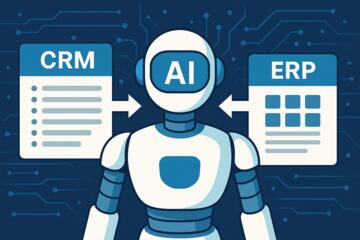
Furthermore, many companies fail to address data hygiene before applying AI. If your underlying data is fragmented across legacy ERPs and disconnected CRMs, the AI will simply generate "garbage in, garbage out" results at a faster pace. Real-world consequences include misallocated marketing budgets or overstocking seasonal inventory based on flawed predictive models that didn't account for outlier events like global supply chain shifts.
Practical Solutions for Intelligent Data Workflows
Leverage Automated Machine Learning (AutoML)
To get results, stop hiring data scientists to build every single regression model. Use platforms like Tableau (with Einstein Discovery) or Power BI to run AutoML. These systems automatically test various algorithms to find the most accurate model for your specific dataset.
In a professional setting, this looks like "Smart Discovery" features. When you upload a dataset, the tool suggests which variables are most likely to drive your Key Performance Indicators (KPIs). For example, Qlik Sense uses an "Associative Engine" combined with AI to suggest visualizations that the user hadn't even considered, uncovering "dark data" relationships.
Implement Natural Language Querying (NLQ)
Search-driven analytics, such as those found in ThoughtSpot or Microsoft Power BI’s Q&A, allow users to interact with data using plain English. This works because the underlying LLM (Large Language Model) maps business terminology to technical metadata.
To make this effective, you must curate your "Data Dictionary." Ensure that terms like "Gross Margin" or "Net Churn" are defined identically across the organization. When implemented correctly, companies see a 40% reduction in ad-hoc report requests to the IT department, freeing up technical talent for high-value architecture projects.
Shift to Predictive and Prescriptive Guardrails
Don't settle for "What happened?" Use tools like SAP Analytics Cloud to run "What-If" simulations. If you increase your price by 5%, how does that affect volume across different regions? AI-driven BI provides a range of probabilities.
Sisense, for instance, allows for "Knowledge Pods" or Infusion Apps that bring these AI insights directly into Slack or Microsoft Teams. Instead of making people go to the data, the AI brings the insight to where the work is happening. Results from these implementations often show a 15–20% improvement in operational efficiency because decisions are made in minutes, not days.
Real-World Case Examples
Case 1: Global Manufacturing Efficiency
A mid-sized automotive parts manufacturer struggled with a 14% equipment downtime rate. They implemented Power BI integrated with Azure Machine Learning. By connecting IoT sensor data to their BI dashboards, the AI identified that a specific vibration pattern in hydraulic presses preceded failure by 48 hours.
-
Action: Transitioned from reactive to predictive maintenance.
-
Result: Downtime dropped to 3.5% within six months, saving an estimated $1.2M in lost production time.
Case 2: E-commerce Personalization at Scale
A multi-brand fashion retailer used ThoughtSpot’s AI-driven search to analyze customer behavior. Previously, segmenting customers took three days of manual SQL work. The AI revealed that customers who bought "Athleisure" in January were 60% more likely to purchase "High-End Accessories" in March if sent a specific discount code.
-
Action: Automated personalized email triggers based on AI-identified segments.
-
Result: A 22% increase in Repeat Purchase Rate (RPR) and a 15% boost in Average Order Value (AOV).
Comprehensive Comparison of Top AI-Integrated BI Platforms
| Feature | Microsoft Power BI (Copilot) | Tableau (Einstein) | ThoughtSpot | Qlik Sense (Insight Bot) |
| Best For | Microsoft ecosystem users | Visual storytelling/Deep dive | Search-based analytics | Complex data integration |
| AI Strength | Seamless DAX generation | Predictive modeling | Natural Language Search | Associative AI engine |
| Ease of Use | High (Excel-like) | Medium (Learning curve) | Very High (Google-like) | Medium |
| Key AI Tool | Copilot for BI | Einstein Discovery | Sage (LLM integration) | Insight Advisor |
| Scalability | Enterprise-grade | Enterprise-grade | Rapidly scaling startups | Global supply chains |
Common Pitfalls and How to Sidestep Them
Mistake: Neglecting the Semantic Layer
AI cannot guess what "Region 4" means if it isn't labeled. You must spend time on data modeling.
-
Correction: Use a robust semantic layer (like those in Looker) to ensure the AI understands the business logic before it starts generating insights.
Mistake: Over-reliance on Generative AI for Accuracy
LLMs can "hallucinate" numbers if they aren't grounded in structured data.
-
Correction: Ensure your BI tool uses "Deterministic AI" (math-based) for the calculations and "Generative AI" (language-based) only for the interface and explanation.
Mistake: Ignoring User Adoption Training
Just because the tool has AI doesn't mean people will use it.
-
Correction: Run "Data Literacy" workshops. Show users how to verify an AI-generated insight so they build trust in the system.
FAQ
Can AI-integrated BI tools replace data analysts?
No. They augment analysts by automating the repetitive tasks of data cleaning and basic visualization. This allows analysts to focus on strategy, data ethics, and complex architectural decisions that AI cannot yet handle.
How secure is my data when using AI in the cloud?
Most enterprise tools like Tableau and Power BI use "Tenant Isolation." Your data is not used to train the public LLM models unless you explicitly opt-in to a public-facing beta. Always check for SOC2 and GDPR compliance.
Do I need a massive budget for these tools?
Not necessarily. Many AI features are now included in standard "Pro" or "Premium" licenses for existing BI suites. The real cost is usually in data preparation and clean-up, not the software license itself.
What is the difference between BI and Augmented Analytics?
Traditional BI is a static report. Augmented Analytics uses AI/ML to automatically find insights, explain them in natural language, and predict future trends without the user having to build a manual model.
Is Natural Language Processing (NLP) really accurate for financial data?
It is highly accurate if your data schema is clean. If your column headers are cryptic (e.g., "COL_X22"), the NLP will fail. If labeled correctly ("Quarterly_Revenue"), the accuracy is near 99%.
Author’s Insight
In my fifteen years of deploying data architectures, I’ve seen that the most successful companies aren't the ones with the most expensive "AI Labs." They are the ones that democratize data. When you put an AI-powered BI tool in the hands of a floor manager or a sales rep, you move the needle on the business immediately. My advice: start with one specific business problem—like reducing churn or optimizing shipping—and let the AI prove its value there before trying to automate your entire enterprise. AI in BI is a marathon of small wins, not a single "magic button."
Conclusion
Transitioning to Business Intelligence tools with built-in AI is no longer a luxury for forward-thinking tech firms; it is a necessity for any organization managing modern data volumes. By focusing on automated insights, natural language interfaces, and predictive modeling through platforms like Power BI, Tableau, or ThoughtSpot, companies can significantly reduce the "time-to-insight" gap. To succeed, prioritize data hygiene, invest in user literacy, and ensure your AI strategy is deeply integrated into your existing business workflows. The goal is clear: stop looking at what happened and start acting on what will happen next.